
Hama Smart Manual
Manual em PDF · 64 Páginas
Português



Verificação rápida
Resposta incorreta, tente novamente.
Converse com o manual do seu Hama Smart através de IA
Obtenha respostas instantâneas de IA a partir do manual do seu Hama Smart
Pergunte qualquer coisa sobre o Hama Smart. As respostas vêm deste manual, com as páginas nas quais se baseiam.
Smart Cronograma de manutencao
Aspire o filtro e a carcaça interna para remover sujeira grossa. Coloque o filtro ao ar livre, sob luz solar direta, por aproximadamente 3 horas para secar e eliminar bactérias.
Com uso diário, o filtro combinado deve ser substituído após aproximadamente 6-12 meses, quando o indicador piscar em vermelho ou a saturação for atingida.
O filtro deve ser substituído no máximo após 1 ano para garantir que remova partículas de forma eficaz e não libere poluentes novamente no ar.
Lembretes de manutencao gratuitos
De acordo com a data de compra. Sempre gratuito, cancele a subscricao quando quiser.
Faça uma Pergunta
Você recomenda Smart?
Sim NãoPerguntas Frequentes
Para uso diário, o filtro combinado deve ser substituído após aproximadamente 6 a 12 meses. Mesmo que o filtro pareça limpo, ele deve ser trocado no máximo após um ano para garantir que os poluentes não sejam liberados de volta para o ar.
Esta resposta foi útil?
Não, o filtro não é lavável. Você pode aspirar a sujeira grossa dele e secá-lo à luz direta do sol por cerca de três horas para eliminar bactérias, mas não pode ser submerso em água.
Esta resposta foi útil?
Não, o dispositivo não consegue remover monóxido de carbono (CO) ou radônio (Rn) do ar. Ele foi projetado para filtrar matéria particulada, poeira, pólen e odores.
Esta resposta foi útil?
Após substituir o filtro, pressione e segure o botão LIGAR/DESLIGAR por aproximadamente 7 segundos para cancelar o alarme e reiniciar o lembrete de troca do filtro.
Esta resposta foi útil?
Não, o dispositivo destina-se apenas a ambientes secos. Alta umidade pode causar condensação no sensor, afetando o desempenho e potencialmente danificando a unidade.
Esta resposta foi útil?
O purificador de ar é adequado para salas de até 21 metros quadrados de acordo com as normas ANSI/AHAM, ou até 65 metros quadrados de acordo com as normas NRCC.
Esta resposta foi útil?
Vantagens e Desvantagens
Vantagens

- Filtração HEPA 13 avançada captura 99,95% das partículas tão pequenas quanto 0,3 micrômetros
- Controle via aplicativo inteligente permite monitoramento remoto e agendamento via WLAN
- Indicador de qualidade do ar em tempo real usa anel LED codificado por cores para feedback instantâneo
- Modo automático ajusta automaticamente a velocidade do ventilador com base nos níveis de poluição detectados
- Filtro de carvão ativado remove eficazmente odores, formaldeído e gases voláteis
Desvantagens

- Filtro não pode ser lavado e deve ser substituído anualmente apesar das tentativas de secagem
- Dispositivo não remove monóxido de carbono ou radônio do ar
- A precisão do sensor pode diminuir se formar condensação devido à alta umidade
- Requer filtros originais específicos da Hama (item No. 00186440) para conformidade com garantia
- Não é adequado para uso em cozinhas ou banheiros devido aos riscos de umidade e gordura
Produto Especificação
Potencia
45W
Cor
preto
Tamanho do Quarto Recomendado
até 21 m²
Velocidades de Ajuste
3 (regulação automática de potência)
Circulação de Ar
0,25 m³/h
Filtragem
3 estágios, filtro HEPA (H13, 99,95%), filtro de carvão ativado, pré-filtro, filtro grosso lavável
Recursos
Modo noturno, temporizador
Casa Inteligente
Controle por aplicativo, assistente de voz (Amazon Alexa, Google Assistant)
Nível de Ruído
30-50dB(A)
Dimensões
24,4x54,4x24,4cm (LxAxP)
Peso
4,1 kg
Produto Descrição
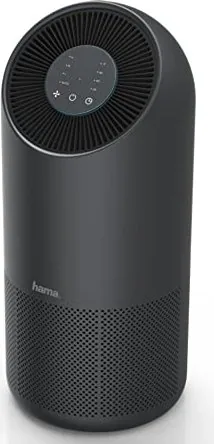
Experimente ar puro com o Purificador de Ar Smart Hama
O Purificador de Ar Smart Hama foi projetado para transformar seu ambiente em um santuário de ar limpo e respirável. Este dispositivo inteligente utiliza um sistema de filtração sofisticado de três etapas para eliminar partículas nocivas, alérgenos e odores desagradáveis da sua casa. Ao combinar um pré-filtro para detritos grandes como cabelo e poeira, um filtro HEPA 13 de alta eficiência para partículas microscópicas até 0,3 micrômetros, e um filtro de carvão ativado para gases e cheiros, ele garante uma purificação abrangente do ar.
O que diferencia este modelo é sua integração perfeita com tecnologia inteligente. Através do aplicativo Hama Smart Home, você pode controlar o purificador remotamente, configurar temporizadores e monitorar a qualidade do ar em tempo real. O anel iluminado fornece feedback visual instantâneo sobre as condições do ambiente, brilhando verde para ar bom, amarelo para normal e vermelho quando a purificação é necessária. O modo automático ajusta a velocidade do ventilador dinamicamente com base nas leituras dos sensores, garantindo desempenho ideal enquanto mantém a eficiência energética.
A manutenção é simples, mas crítica para a longevidade. A unidade possui uma função de lembrete que avisa quando o filtro precisa ser substituído, geralmente a cada seis a doze meses dependendo do uso. Para cuidados intermediários, o filtro pode ser aspirado e secado ao sol para estender sua vida útil, embora deva ser substituído anualmente para manter a eficácia máxima. O dispositivo também lembra suas últimas configurações ao reiniciar, oferecendo conveniência sem sacrificar a funcionalidade.
Ideal para ambientes de até 65 metros quadrados, o Purificador de Ar Smart Hama combina desempenho poderoso com design elegante. Seja combatendo alergias sazonais ou simplesmente buscando ar interior mais fresco, esta solução inteligente oferece resultados confiáveis com esforço mínimo. Lembre-se de manter as janelas fechadas durante a operação para melhores resultados e evite colocar a unidade perto de fontes de calor ou umidade.
Notas Importantes de Manutenção
- Sempre desconecte a energia antes de limpar ou trocar os filtros.
- Não lave o filtro; apenas aspire e seque ao sol.
- Substitua o filtro pelo menos uma vez por ano para evitar a reemissão de partículas.
- Garanta uma folga de 20cm ao redor dos lados e 30cm acima da unidade.
Pesquisar por 67.732 Manuais online


Digite a marca ou modelo