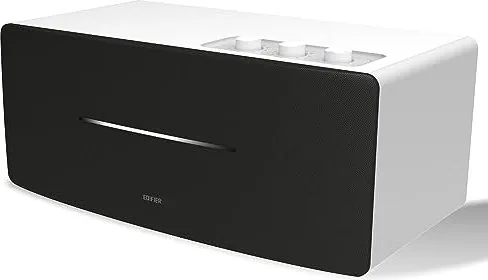
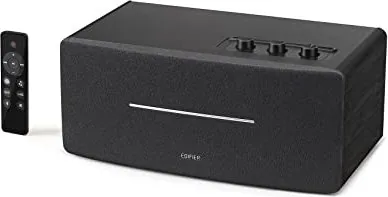
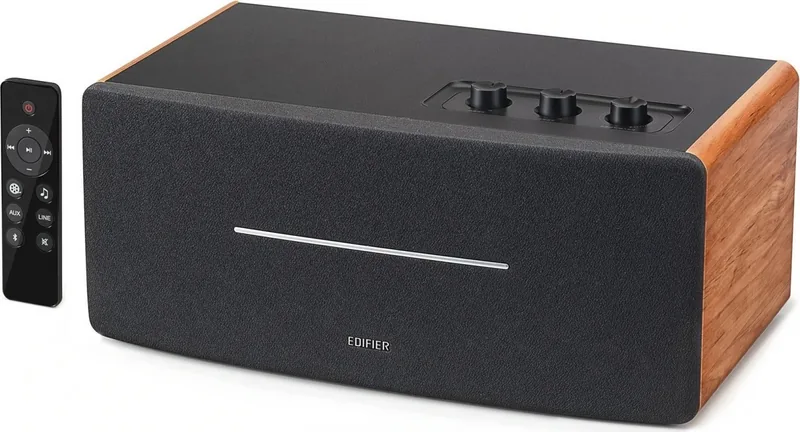
Примечание: Изображение приведено для справки. Конструкция может отличаться.
Иллюстрации
1. Переключатель питания
2. Кабель питания
3. Линейный выход
4. AUX вход
5. Линейный вход
6. Регулятор НЧ
7. Регулятор ВЧ
8. Управление общей громкостью/селектор входа
Переключатель режима входа: нажмите
Отключите Bluetooth: нажмите и удерживайте
(Bluetooth уже подключен)
Включение питания:
нажмите/нажмите и удерживайте
(когда питание выключается дистанционно и
переключатель питания уже включен)
Выключение питания: нажмите и удерживайте
9. Инфракрасный приемник/входной индикатор
Зеленая лампочка непрерывно горит:
AUX/линейный вход
Быстро мигает голубая лампочка:
Bluetooth не подключен
Голубая лампочка непрерывно горит:
Bluetooth уже подключен
Bluetooth вход
Выходная мощность: П/Л (ВЧ): 15 Вт+15 Вт
П/Л (средний диапазон и бас): 20 Вт+20 Вт
Частотный диапазон: 54Hz-20KHz
Звуковой вход: AUX, Линейный вход, Bluetooth
Звуковой выход: Линейный выход
Декларация для ЕС
Частотный диапазон Bluetooth: 2,402 ~ 2,480 ГГц
Радиочастотная выходная мощность: ≤20 дБм (EIRP)
Ограничения на эксплуатацию отсутствуют.
Пульт дистанционного управления (ДУ)
Подключения
Линейный вход
Руководство пользователя
Пульт дистанционного
управления (ДУ)
Колонка
Аудиокабель 3.5 mm-RCA
1. Включение/выключение
2. Увеличение громкости
3. Предыдущая /cледующая запись
(Bluetooth вход)
4. Пауза/воспроизведение
(Bluetooth вход)
5. Уменьшение громкости
6. Режим кино (расширенное
звуковое поле, идеален при
просмотре кинофильмов)
Примечание.
1. Не подвергайте пульт ДУ избыточному нагреву или воздействию влажности.
2. Не заряжайте батарейки.
3. Если изделие не используется длительное время, извлеките из него батарейки.
4. Не подвергайте батарейку сильному нагреву, например, прямой солнечный свет, огонь и т.п.
5. Опасность взрыва при неправильной установке батарейки. Заменяйте использованные батарейки
только на изделия такого же или аналогичного типа.
Установка батареек:
Для открывания отсека для батареек
см. рисунок, вставьте батарейку
CR2032 и закройте отсек.
или
• Нажмите регулятор "volume/input" на колонке для переключения в режим дополнительного
входа AUX (один раз мигнет зеленая лампочка) или в режим входной линии (зеленая лампочка
мигнет два раза).
• Соответственно нажмите кнопку "AUX"/"LINE" дистанционного управления для переключения в
режим дополнительного/линейного входа.
• Нажмите кнопку " " дистанционного управления или регулятор "volume/input" на колонке для
переключения в режим входа Bluetooth – голубая лампочка будет быстро мигать.
• Настройте мобильный телефон на поиск и подключение к "EDIFIER D12", причем после успешного
формирования пары голубая лампочка будет непрерывно гореть.
• Чтобы отключить Bluetooth, нажмите и удерживайте кнопку " " дистанционного управления или
нажмите и удерживайте 2 секунды регулятор "volume/input" на колонке.
Примечание:
• Для использования всех функций Bluetooth данного устройства, пожалуйста, обеспечьте в
подключаемом мобильном устройстве поддержку профиля A2DP(Advanced Audio Distribution
Profile, расширенный профиль распространения аудио) и AVRCP(Audio/Video Remote Control Profile,
профиль дистанционного управления аудио/видео).
• Подключение и совместимость по Bluetooth может отличаться в разных звуковых устройствах в
зависимости от версий программного обеспечения в них.
7. Режим музыки (отлично настроенный
собственный звук, идеален при
прослушивании музыки)
8. AUX вход
9. Линейный вход
10. Bluetooth вход
Hажмите и удерживайте для
отключения Bluetooth
11. Выключение звука
Примечание: В кинорежиме расширение звукового поля будет меняться,
иначе снижается качество звука. Поэтому, пожалуйста, разрешите режим
музыки при прослушивании музыкальных записей.
ПРЕДУПРЕЖДЕНИЕ!
1. Не проглатывать батарейку, Это опасно!
2. Изделие содержит дисковую батарейку. Проглоченная батарейка может вызвать травму или
смерть. Не храните новые или старые батарейки в местах, доступных для детей.
3. Если отсек для батареек закрывается неплотно, прекратите использовать пульт ДУ и храните его
вне доступа детей.
4. В случае подозрений на проглатывание батарейки немедленно обратитесь к врачу.
Устранение
• Проверьте, включен ли динамик.
• Попробуйте увеличить громкость с помощью главного регулятора или на пульте ДУ.
• Убедитесь, что аудиокабели подключены правильно, и в звуковых колонках правильно выбран
вход.
• Проверьте сигнал на выходе источника звука.
Не удается подключиться по Bluetooth
• Убедитесь, что колонка переключена на вход Bluetooth, поскольку в других входных режимах
невозможно создание пары или подключение по Bluetooth.
Отключитесь от Bluetooth-устройства нажав и удерживая кнопку " " в режиме Bluetooth, затем
повторите попытку.
• Рабочий диапазон передачи по Bluetooth составляет 10 метров, поэтому работайте только в этом
диапазоне.
• Попробуйте подключить другое устройство Bluetooth.
Колонка D12 не включается
• Убедитесь, что колонка подключена к сети электропитания, и что розетка сети включена.
Помехи от динамиков
• Колонки фирмы EDIFIER генерируют небольшие помехи, в то время как фоновые помехи
некоторых аудио устройств являются очень большими. Отсоедините аудио кабели и увеличите
громкость, если на расстоянии 1 м из динамика ничего не слышно, значит у этого изделия нет
проблем.
Дополнительные сведения о EDIFIER см. на веб-сайте www.edifier.com
Для запросов к EDIFIER по гарантийным обязательствам посетите страницу соответствующей
страны на www.edifier.com и ознакомьтесь с разделом гарантийных обязательств.
США и Канада: service@edifier.ca
Южная Америка: Информацию о местных представительствах см. на веб-сайте www.edifier.com
(английский язык) или www.edifierla.com (испанский/португальский язык).
Power
Off
On
или
или
Аудиокабель RCA-RCA
SpecificationsTroubleshooting
Box contents
Note: Images are for illustrative purposes only and may differ from the actual product.
Illustration
Bluetooth input
Power output: R/L(treble): 15W+15W
R/L(mid-range and bass): 20W+20W
Frequency response: 54Hz-20KHz
Audio input: AUX, Line in, Bluetooth
Audio output: Line out
Declaration for EU
Frequency Band: 2.402GHz ~ 2.480GHz
RF Power output: ≤20 dBm (EIRP)
There is no restriction of use.
Remote control
Connection
Line in input
User manual
Remote controlSpeaker
3.5mm-RCA audio cable
⑦⑧
⑥
③②①④⑤
⑨
⑦⑧
⑥
③②①④⑤
⑨
⑦⑧
⑥
③②①④⑤
⑨
⑦⑧
⑥
③②①④⑤
⑨
⑦⑧
⑥
③②①④⑤
⑨
⑦⑧
⑥
③②①④⑤
⑨
⑦⑧
⑥
③②①④⑤
⑨
⑦⑧
⑥
③②①④⑤
⑨
1. Power on/off
2. Volume up
3. Previous track/next track
(Bluetooth input)
4. Pause/play
(Bluetooth input)
5. Volume down
6. Movie mode
(extended sound field,
ideal for watching movie)
Note:
1. Do not place the remote control in places that are hot and humid.
2. Do not charge the batteries.
3. Remove the batteries when unused for a long period of time.
4. The battery should not be exposed to excessive heat such as direct sun, fire or similar.
5. Danger of explosion if battery is incorrectly replaced. Replace only with the same or equivalent type.
Battery loading:
Please refer to the illustration to open the battery
compartment, insert the CR2032 battery and
close the compartment.
or
• Press the "volume/input" dial on the speaker to switch to AUX input (green light flashing once) or Line in input (green light
flashing twice).
• Respectively press the "AUX" / "LINE" button on the remote control to switch to AUX/Line in input.
• Press the " " button on the remote control or press the "volume/input" dial on the speaker to switch to Bluetooth input,
blue light will flash rapidly.
• Set your mobile phone to search for and connect to "EDIFIER D12", after pairing is successful, the blue light will be steady lit.
• To disconnect Bluetooth, press and hold the " " button on the remote control or press and hold the "volume/input" dial on
the speaker for 2 seconds.
Note:
• To enjoy all Bluetooth functions of this product, please ensure your audio source device has A2DP (Advanced Audio Distribution
Profile) and AVRCP (Audio Video Remote Control Profile) profile.
• Bluetooth connectivity and compatibility may differ amongst different source devices, depending on the software versions of
source devices.
7. Music mode
(highly restored on-site sound,
ideal for listening to music)
8. AUX input
9. Line input
10. Bluetooth input
Press and hold to disconnect Bluetooth
11. Mute
Note: In Movie mode, the sound quality will be changed or distorted when the sound field is
extended. Therefore, please enable Music mode when listening to music.
WARNING!
1. Don’t swallow the battery; danger of chemical burn.
2. The product includes a wafer battery. Swallowing this battery may lead to injury or death. Do not place the new or old battery
in where children can get to it.
3. Don’t use the product if the battery cover is missing or not closed, and keep the remote inaccessible to children.
4. Please go to the hospital immediately if the battery is swallowed.
No sound
• Check if the speaker is ON.
• Try to turn up the volume using the volume control or remote control.
• Ensure the audio cables are firmly connected and the input is set correctly on the speaker.
• Check if there is a signal output from the audio source.
Cannot connect via Bluetooth
• Make sure the speaker is switched to Bluetooth input. If it is in other audio input modes, Bluetooth will not
connect. Disconnect from any Bluetooth device by pressing and holding the " " button, then try again.
• Effective Bluetooth transmission range is 10 meters; please ensure that operation is within that range.
• Try another Bluetooth device for connection.
The D12 does not turn on
• Check if main power is connected, or if the wall outlet is switched on.
Noise coming from speakers
• EDIFIER speakers generate little noise, while the background noise of some audio devices are too high. Please
unplug audio cables and turn the volume up, if no sound can be heard at 1 meter away from the speaker, then
there is no problem with this product.
1. Power switch
2. Power cable
3. Line out
4. AUX input
5. Line in
6. Bass dial
7. Treble dial
8. Volume control/input selector
Input mode switch: press
Disconnect Bluetooth: press and hold
(Bluetooth already connected)
Power on: press/press and hold
(when powered off via remote control,
and power switch already turned on)
Power off: press and hold
9. Infrared receiver/input indicator
Green light steady lit: AUX/Line in
Blue light flashing rapidly: Bluetooth unconnected
Blue light steady lit: Bluetooth already connected
Power
Off
On
or
or
To learn more about EDIFIER, please visit www.edifier.com
For EDIFIER warranty queries, please visit the relevant country page on www.edifier.com and review the section
titled Warranty Terms.
USA and Canada: service@edifier.ca
South America: Please visit www.edifier.com (English) or www.edifierla.com (Spanish/Portuguese) for local contact
information.
RCA-RCA audio cable
Substituição e instalação da bateria
Rode a tampa da bateria no sentido da seta e
retire-a, instale corretamente a bateria CR2032
no respetivo compartimento e, em seguida,
feche a tampa da bateria.
User manual | Manuel d’utilisateur | Manual de usuario | Bedienungsanleitung | Manuale dell’utente
Manual do utilizador |
ユーザーズガイド | Руководство пользователя
11
Français
12
Français
13
Français
14
Français
15
Français
16
Français
17
Français
20
Français
19
Français
18
Français
21
Español
22
Español
23
Español
24
Español
25
Español
26
Español
30
Español
29
Español
28
Español
27
Español
38
Deutsch
37
Deutsch
31
Deutsch
32
Deutsch
36
Deutsch
35
Deutsch
40
Deutsch
39
Deutsch
34
Deutsch
33
Deutsch
41
Italiano
45
Italiano
48
Italiano
47
Italiano
49
Italiano
46
Italiano
42
Italiano
50
Italiano
44
Italiano
43
Italiano
52
Português
54
Português
56
Português
55
Português
58
Português
57
Português
60
Português
59
Português
53
Português
51
Português
63
日本語
64
日本語
65
日本語
66
日本語
67
日本語
68
日本語
69
日本語
70
日本語
61
日本語
62
日本語
73
Русский
74
Русский
75
Русский
76
Русский
77
Русский
78
Русский
79
Русский
80
Русский
71
Русский
72
Русский
版本号及料号: V1.0/IB-200-D12000-00
名 称: D12(英法西德意葡日俄)说明书
材 质:
尺 寸: 127×127(MM) 校 对:
批 准:
东莞市漫步者科技有限公司
80g书纸
(
封面和底面用100g书纸)
对折,胶装
/1
%
Verificação rápida
Não sou um robô
Resposta incorreta, tente novamente.
Converse com o manual do seu Edifier D12 através de IA
Obtenha respostas instantâneas de IA a partir do manual do seu Edifier D12
Pergunte qualquer coisa sobre o Edifier D12. As respostas vêm deste manual, com as páginas nas quais se baseiam.
Faça uma Pergunta
0/1000
Você recomenda D12?
SimNão
Perguntas
Frequentes
A
Ligue o alto-falante e gire o seletor de entrada até que a luz azul pisque rapidamente. No seu telefone, procure por 'EDIFIER D12' nas configurações de Bluetooth e selecione-o. Uma vez conectado, a luz azul ficará fixa.
Esta resposta foi útil?
A
O Modo Filme expande o campo sonoro para uma experiência mais imersiva ideal para assistir filmes. O Modo Música fornece uma assinatura sonora altamente restaurada e precisa perfeita para ouvir gravações musicais.
Esta resposta foi útil?
A
Sim. Você pode conectar dispositivos externos usando a entrada AUX com um cabo de 3.5mm ou a entrada Linha de Entrada com cabos RCA. Basta alternar o modo de entrada usando o botão giratório ou o controle remoto.
Esta resposta foi útil?
A
Para desconectar, pressione e segure o botão Bluetooth no controle remoto ou o botão giratório de volume/entrada no alto-falante por dois segundos enquanto estiver no modo Bluetooth.
Esta resposta foi útil?
A
Primeiro, verifique se o alto-falante está ligado e o volume está aumentado. Verifique se os cabos de áudio estão firmemente conectados e se a fonte de entrada correta foi selecionada. Certifique-se de que seu dispositivo de origem está realmente emitindo áudio.
Esta resposta foi útil?
A
Não, o controle remoto usa uma bateria de botão CR2032 que não é recarregável. Substitua-a por um tipo equivalente quando a bateria acabar.
Esta resposta foi útil?
A
O intervalo de transmissão efetivo é de 10 metros. Certifique-se de que seu dispositivo permaneça dentro dessa distância para uma conexão estável.
Esta resposta foi útil?
M: QW-35-FL
Vantagense
Desvantagens
Vantagens
Saída de áudio de alta qualidade com 40W de potência total
Opções de conectividade versáteis incluindo Bluetooth, AUX e Linha de Entrada
Modos dedicados de Filme e Música para diferentes tipos de conteúdo
Inclui controle remoto para operação conveniente
Botões giratórios de graves e agudos ajustáveis para sintonização de som personalizada
VS
Desvantagens
Alcance Bluetooth limitado a aproximadamente 10 metros
Sem bateria recarregável embutida; requer tomada de energia constante
Controle remoto usa bateria de botão não recarregável
Modo Filme pode distorcer a qualidade de som para audição de música
Indicadores LED podem ser difíceis de ver em ambientes brilhantes
M: QW-35-FL
Produto
Especificação
Potência
70W RMS
Visor
Não
Sintonizador
Não
Faixa de Frequência
54Hz-20kHz
Conexões
Entrada AUX (conector de 3,5mm), Entrada de Linha Estéreo (RCA), Saída de Linha Estéreo (conector de 3,5mm)
Sem Fio
Bluetooth 5.0
Fonte de Alimentação
Alimentação CA
Recursos
Controle Remoto
Dimensões
35,89x20,30x15,90 cm (LxAxP)
Peso
4,60 kg
M: QW-35-FL
Produto
Descrição
Descubra o Alto-falante Bluetooth Stereo Edifier D12
O Edifier D12 é um alto-falante stereo versátil projetado para trazer áudio de alta qualidade à sua configuração de entretenimento em casa. Seja transmitindo música sem fio ou conectando via cabos tradicionais, este dispositivo oferece uma experiência de escuta perfeita. Com seu design elegante e conjunto robusto de recursos, destaca-se como uma excelente escolha tanto para audiófilos quanto para ouvintes casuais.
No coração do D12 estão dois drivers poderosos capazes de entregar 40 watts de saída total. O sistema separa as frequências efetivamente, fornecendo agudos nítidos de 15W por canal e graves profundos e ressonantes e tons médios de 20W por canal. Este equilíbrio garante que cada nota da sua playlist favorita seja reproduzida com clareza e profundidade. A resposta de frequência varia de 54Hz a 20KHz, cobrindo a vasta maioria dos sons audíveis.
A conectividade é onde o D12 realmente brilha. Ele suporta múltiplos métodos de entrada incluindo Bluetooth, AUX e Linha de Entrada. O módulo Bluetooth opera dentro da banda padrão de 2.4GHz, permitindo uma conexão estável até 10 metros de distância. Uma vez pareado com seu smartphone ou tablet, a luz indicadora azul confirma uma conexão bem-sucedida. Para aqueles que preferem conexões cabeadas, o painel traseiro possui entradas dedicadas para cabos RCA e 3.5mm, tornando-o compatível com dispositivos mais antigos e computadores modernos.
O controle remoto incluso adiciona uma camada de conveniência, permitindo que você gerencie o volume, troque faixas e alterne entre modos sem sair do seu assento. Dois perfis de som distintos estão disponíveis: Modo Filme expande o campo sonoro para experiências cinematográficas imersivas, enquanto Modo Música restaura a fidelidade original das gravações para puro prazer acústico. Os usuários também podem ajustar os níveis de graves e agudos usando os botões giratórios no alto-falante para personalizar o som de acordo com suas preferências pessoais.
A instalação é simples, exigindo apenas um cabo de alimentação e sua fonte de áudio escolhida. A unidade possui indicadores LED claros para mostrar o status atual da entrada, garantindo que você sempre saiba qual modo está ativo. Avisos de segurança sobre a bateria de botão no controle remoto são proeminentes, enfatizando a importância de manter baterias sobressalentes fora do alcance das crianças.
Resumo dos Principais Recursos
Saída Poderosa: 15W de agudos + 20W de graves/médios por canal para som rico.
Suporte Multi-Entrada: Conecte via Bluetooth, AUX ou Linha de Entrada facilmente.
Controle Remoto: Funcionalidade completa para volume, reprodução e troca de modos.
Modos de Som: Escolha entre Modo Filme para filmes e Modo Música para álbuns.
EQ Ajustável: Botões giratórios dedicados para sintonia fina dos níveis de graves e agudos.
Notas Importantes
Sempre certifique-se de que a tampa da bateria esteja segura no controle remoto para evitar riscos de ingestão acidental. Se você experimentar problemas de ruído, verifique se nenhum outro dispositivo de áudio está gerando interferência excessiva de fundo. Para suporte de garantia, visite o site oficial da Edifier para sua região específica.